The Keys to Your Google Account — Do You Know Who Has Them, and Why You Should Check Now
Why connected apps and third-party permissions on your Google account deserve regular review, even when your password is secure.
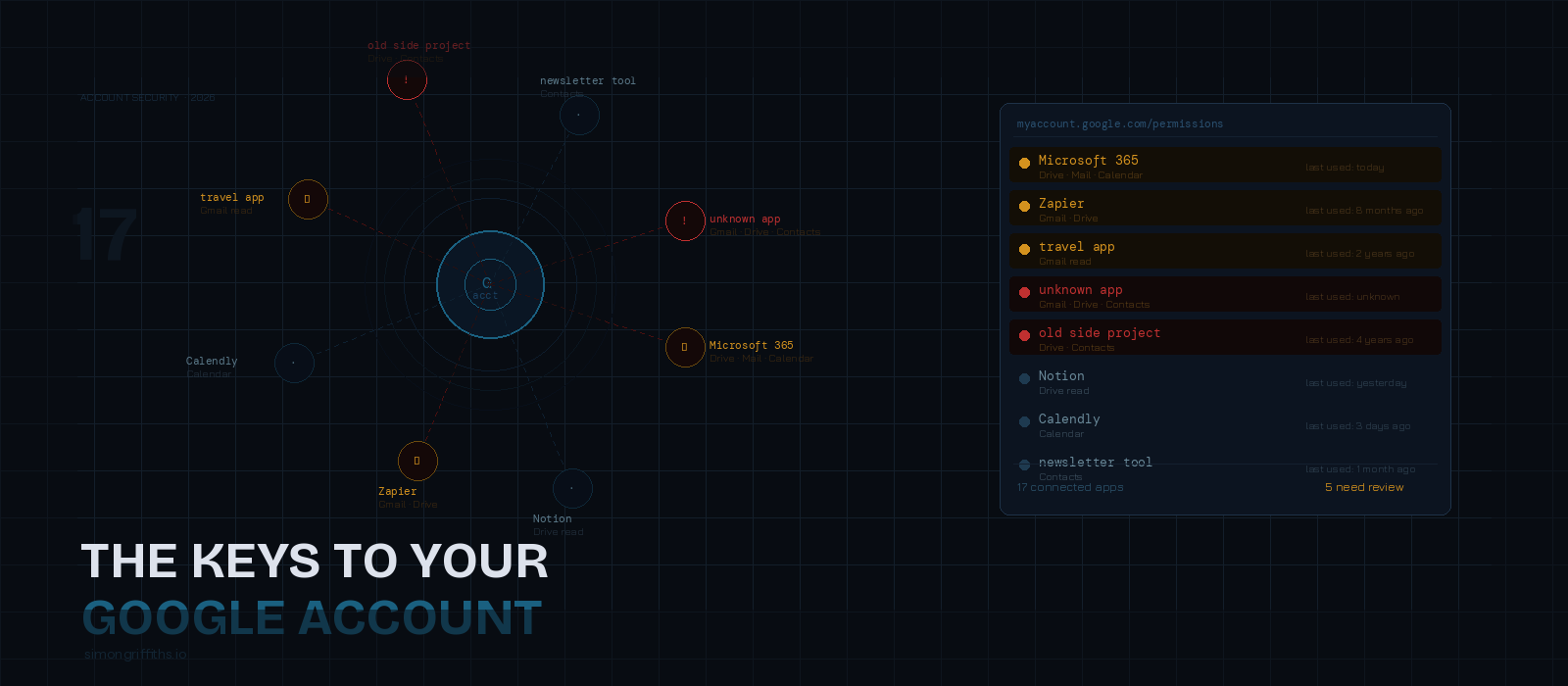
Go to myaccount.google.com/permissions right now. Count how many apps are listed.
I’ll go first. I found seventeen. And I say that as someone who has never been particularly keen on Google sign-on — I’ve always had a mild instinct against it, preferring to create separate accounts where I could. Seventeen anyway. A decade of occasional lapses, free trials, and moments of convenience adds up.
Some I recognised immediately. Some took a moment. A couple I had no memory of at all.
And then there was Microsoft.
Microsoft has access to my Google Drive. I stared at that for a moment. I use Microsoft 365. I use Google Workspace. At some point I apparently connected them, presumably to make file access easier between the two. I have no memory of doing this, no memory of what I expected it to enable, and honestly no clear idea why it still needs that access now. I haven’t revoked it yet — I want to understand it first — but I’m uncomfortable that it’s there and I can’t account for it.
If that’s my list, after actively trying to limit this kind of thing, yours is probably longer.
What actually happens when you click “Sign in with Google”
“Sign in with Google” is genuinely good technology. The underlying mechanism — OAuth 2.0 — is well-designed and widely trusted. When you use it, Google authenticates you and issues a token to the third-party app confirming who you are. Your Google password never touches that app. For authentication alone, it’s arguably better practice than creating yet another account with a password you’ll reuse or forget.
The problem isn’t the login. It’s what comes alongside it.
Most apps don’t just ask to verify your identity. They ask for more. When you click through the permissions screen — and almost everyone clicks through without reading — you may be granting access to your Gmail inbox, your Google Calendar, your Drive, your contacts. The permission request is buried in the flow between “I want to use this app” and “let me get on with it.” Most people have no memory of what they agreed to, because the decision felt like a formality rather than a choice.
That access doesn’t expire when you stop using the app. It stays live until you explicitly revoke it.
The accumulation problem
Think back over the last decade. Every productivity tool you tried for a week and abandoned. Every news aggregator, travel app, email client, scheduling tool, document editor, or side project that asked you to sign in with Google. Every free trial. Every app a colleague recommended that turned out to be more trouble than it was worth.
Each of those has a token. Each token is a live connection to your account with whatever permissions you granted at the time.
The average person who has been using a Google account for ten years has somewhere between thirty and sixty of these active connections. I managed fewer than that by being cautious, and I still found things I couldn’t fully account for. If you’ve been more relaxed about it — which is entirely reasonable, it’s designed to feel frictionless — your list will be longer.
Most are benign. But benign isn’t the same as inert, and not all of them are benign. Some of those apps will have been acquired by other companies since you authorised them. Some will have changed their privacy policies in ways you were notified about via an email you didn’t read. Some will have been breached. A small number may have been poorly built from the start, storing tokens insecurely or sharing them in ways you didn’t intend.
What a breach at one of those apps means in practice
When an app that holds your OAuth token is compromised, the attacker doesn’t get your Google password. But depending on what you authorised, they may get something considerably more useful: persistent, authenticated access to parts of your Google account.
If the app had Gmail read access — common for email productivity tools, travel apps that track bookings, or anything that offered to “automatically find your receipts” — an attacker with that token can read your email. That includes password reset flows, two-factor authentication codes sent by email, bank notifications, everything. Gmail read access is, in practice, a significant fraction of what full account compromise would give an attacker.
Drive access means your documents. Contacts means your address book. None of it requires your password. The token is sufficient.
This is the version of the problem that has escalated recently. Breaching a small SaaS app that holds thousands of OAuth tokens with Gmail access is a realistic target for automated, AI-assisted attacks in a way it wasn’t a few years ago. The tokens are valuable. The apps holding them are often small, under-resourced, and running software that hasn’t been properly audited in years. The combination is not comfortable.
The audit: what to actually do
Go to myaccount.google.com/permissions. You’ll see every app that has access to your Google account, what level of access it has, and when it last used that access.
Work through the list with these questions:
Do I still use this? If you haven’t used an app in more than six months and don’t intend to, revoke it. There’s no cost to doing so — if you use the app again, you can reauthorise it in seconds.
What access does it have? Profile and email address only — low risk, probably fine. Gmail read, Drive access, Contacts — ask whether you actively need this app to have that right now. If you’re not sure why it has it, that uncertainty is reason enough to revoke.
Do I recognise this? If you don’t recognise an app, revoke it immediately. This includes anything with a vague or generic name — “Document Manager”, “Mail Tools”, anything that sounds like it could be anything.
Does this app still exist? Some will have been shut down or acquired. A token held by an app that no longer exists in its original form is worthless to keep.
On the Microsoft question specifically: I’m going to work out what that connection is actually doing before I decide. It may be entirely legitimate and something I’d want to keep. But the fact that I can’t immediately explain it is the point — that’s precisely the kind of access that slips through unexamined.
Revoking access doesn’t delete your account with a service. It just removes the live connection to your Google account. You can always reconnect.
The hierarchy of risk
Not all OAuth access is equal.
Gmail read or send access is the top priority. Anyone holding this can intercept communications, read password reset flows, and access any two-factor codes delivered by email. Revoke anything here that isn’t something you actively use and consciously trust.
Drive access is next — documents, spreadsheets, anything stored there. Contacts and Calendar are meaningful but lower risk for most people. Basic profile access — name, email, profile photo — is low risk and not worth losing sleep over.
The broader point
This series started with debit card details and payment security. The thread running through all of it is the same: the risk isn’t usually a single dramatic failure. It’s the accumulated surface area of a decade of small decisions, each of which seemed inconsequential at the time.
You clicked through a permissions screen in 2017. The app you authorised was acquired in 2021. The acquiring company was breached last year. The token you granted seven years ago is still live.
None of that required you to do anything wrong. It just required time, and the reasonable assumption that these things were being managed somewhere on your behalf.
They aren’t. The list is at myaccount.google.com/permissions and it takes ten minutes to go through it.
I found seventeen. Go and see what you find.